8.4. Adding an agent
This tutorial will show how we can add additional agents to the model, and modify the objectives of these agents.
Again, we will build off the default model that comes with MUSE. To copy the files for this model, run:
python -m muse --model default --copy PATH/TO/COPY/THE/MODEL/TO
We will begin by adding a second agent to this model. Compared to the current agent, which bases investment decisions on minimising LCOE, the second agent will aim to minimise fuel consumption costs.
8.4.1. Creating an agent
To create the new agent, we must first modify the Agents.csv file in the directory:
{PATH_TO_MODEL}/Agents.csv
To start with, we will copy the data for agent A1 to create a new agent A2, and we will change the objective of this agent to fuel_consumption_cost. We keep Objsort1 as True, which indicates that the objective should be minimised, rather than maximised. Also notice that we amend the Quantity column, to specify that each agent makes up 50% of the population.
Again, we only show some of the columns due to space constraints, however see here for the full file.
AgentShare |
Name |
RegionName |
Objective1 |
… |
ObjData1 |
… |
DecisionMethod |
Quantity |
… |
Type |
|---|---|---|---|---|---|---|---|---|---|---|
Agent1 |
A1 |
R1 |
LCOE |
… |
1 |
… |
singleObj |
0.5 |
… |
New |
Agent2 |
A2 |
R1 |
fuel_consumption_cost |
… |
1 |
… |
singleObj |
0.5 |
… |
New |
We then edit all of the Technodata files to split the existing capacity between the two agents by the proportions we like. As we now have two agents which take up 50% of the population each, we will split the existing capacity by 50% for each of the agents.
The new technodata file for the power sector should look like the following:
ProcessName |
RegionName |
Time |
cap_par |
cap_exp |
… |
Agent1 |
Agent2 |
|---|---|---|---|---|---|---|---|
Unit |
Year |
MUS$2010/PJ_a |
… |
New |
New |
||
gasCCGT |
R1 |
2020 |
23.78234399 |
1 |
… |
0.5 |
0.5 |
windturbine |
R1 |
2020 |
36.30771182 |
1 |
… |
0.5 |
0.5 |
Remember you will have to make the same changes for the residential and gas sectors!
We will now save this file and run the new simulation model using the following command:
python -m muse settings.toml
Again, we use seaborn and pandas to analyse the data in the Results folder.
[1]:
import matplotlib.pyplot as plt
import pandas as pd
import seaborn as sns
[2]:
mca_capacity = pd.read_csv(
    "../tutorial-code/add-agent/1-single-objective/Results/MCACapacity.csv"
)
mca_capacity.head()
[2]:
| agent | capacity | dst_region | installed | region | sector | technology | type | year | |
|---|---|---|---|---|---|---|---|---|---|
| 0 | A1 | 5.0 | R1 | 2020 | R1 | residential | gasboiler | newcapa | 2020 |
| 1 | A2 | 5.0 | R1 | 2020 | R1 | residential | gasboiler | newcapa | 2020 |
| 2 | A1 | 0.5 | R1 | 2020 | R1 | power | gasCCGT | newcapa | 2020 |
| 3 | A2 | 0.5 | R1 | 2020 | R1 | power | gasCCGT | newcapa | 2020 |
| 4 | A1 | 7.5 | R1 | 2020 | R1 | gas | gassupply1 | newcapa | 2020 |
This time we can see that there is data for the new agent, A2. Next, we will visualise the investments made by each of the agents using seaborn’s facetgrid command. For simplicity, we will only visualise the residential sector.
[3]:
mca_capacity = pd.read_csv(
    "../tutorial-code/add-agent/1-single-objective/Results/MCACapacity.csv"
)
sector_data = mca_capacity[mca_capacity["sector"] == "residential"]
sector_capacity = (
    sector_data.groupby(["year", "agent", "technology"]).sum().reset_index()
)
g = sns.FacetGrid(data=sector_capacity, col="agent")
g.map_dataframe(
    lambda data, **kwargs: data.pivot(
        index="year", columns="technology", values="capacity"
    ).plot(kind="bar", stacked=True, ax=plt.gca())
)
g.add_legend()
g.set_ylabels("Capacity (PJ)")
g.figure.suptitle("Residential Sector:")
g.figure.subplots_adjust(top=0.8)
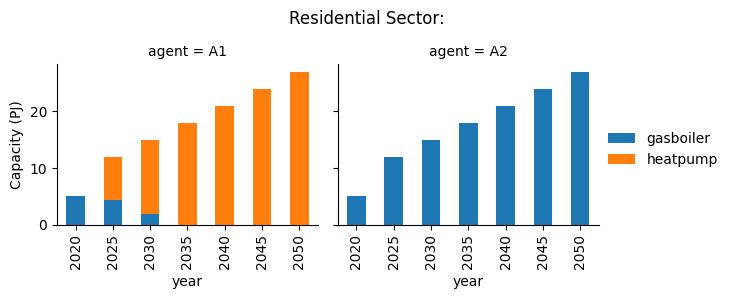
We can see different results between the two agents. Whilst agent A1 invests heavily in heat pumps, agent A2 invests entirely in gas boilers, due to the lower fuel costs of this technology.
8.4.2. Combining multiple objectives
We can also use multiple objectives for a single agent, combining objectives by taking a weighted sum. We will try this for agent A2, using both fuel_consumption_cost and LCOE with relative weights of 0.5 each.
To do this, we need to add the new objective in the Objective2 column, use Objsort2 to indicate that this objective should be minimised, modify DecisionMethod to indicate that a weighted sum should be taken between the two objectives, and specify the weights of the two objectives in ObjData1 and ObjData2:
AgentShare |
Name |
RegionName |
Objective1 |
Objective2 |
… |
ObjData1 |
ObjData2 |
… |
Objsort2 |
… |
DecisionMethod |
Quantity |
… |
Type |
|---|---|---|---|---|---|---|---|---|---|---|---|---|---|---|
Agent1 |
A1 |
R1 |
LCOE |
… |
1 |
… |
… |
singleObj |
0.5 |
… |
New |
|||
Agent2 |
A2 |
R1 |
fuel_consumption_cost |
LCOE |
… |
0.5 |
0.5 |
… |
True |
… |
weighted_sum |
0.5 |
… |
New |
We will then re-run the simulation, and visualise the results as before:
[4]:
mca_capacity = pd.read_csv(
    "../tutorial-code/add-agent/2-multiple-objective/Results/MCACapacity.csv"
)
sector_data = mca_capacity[mca_capacity["sector"] == "residential"]
sector_capacity = (
    sector_data.groupby(["year", "agent", "technology"]).sum().reset_index()
)
g = sns.FacetGrid(data=sector_capacity, col="agent")
g.map_dataframe(
    lambda data, **kwargs: data.pivot(
        index="year", columns="technology", values="capacity"
    ).plot(kind="bar", stacked=True, ax=plt.gca())
)
g.add_legend()
g.set_ylabels("Capacity (PJ)")
g.figure.suptitle("Residential Sector:")
g.figure.subplots_adjust(top=0.8)
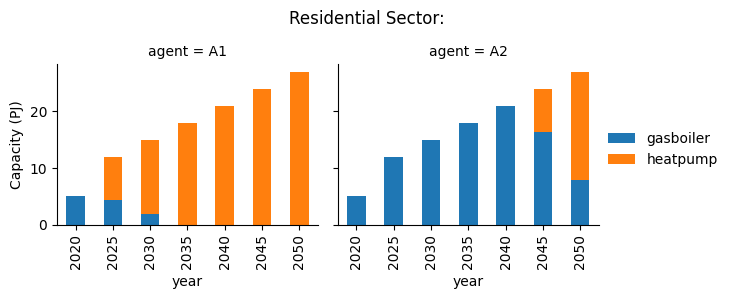
In this scenario we can see that agent A2 has an intermediate behaviour compared to the two agents in the first simulation, investing in both gas boilers and heat pumps.
8.4.3. Summary
From this small scenario, the difference between investment strategies between agents is evident. This is one of the key benefits of agent-based models when compared to optimisation-based models.
Have a play around with the files to see if you can come up with different scenarios!