8.3. Adding a service demand by correlation
In the previous tutorial we added an exogenous service demand. That is, we explicitly specified what the demand would be per year. However, we may not know what the electricity demand may be per year. Instead, we may conclude that our electricity demand is a function of the GDP and population of a particular region. To accommodate such a scenario, MUSE enables us to choose a regression function that estimates service demands from GDP and population, which may be more certain in your case. In this section we will show how this can be done.
This tutorial will build off the default model that comes with MUSE. To copy the files for this model, run:
python -m muse --model default --copy PATH/TO/COPY/THE/MODEL/TO
8.3.1. Additional files
Similarly to before, we must amend the residential_presets folder. As we are no longer explicitly specifying demand, we can delete the Residential2020Consumption.csv and Residential2050Consumption.csv files. Instead, we must replace these files with the following:
A macrodrivers file: This contains the drivers of the service demand that we want to model. For this example, these will include GDP based on purchasing power parity (GDP PPP) and the population that we expect from 2010 to 2110.
A regression parameters file: This file will set the function type we would like to use to predict the service demand and the respective parameters of this regression file per region.
A timeslice share file: This file sets how the demand is shared between timeslice.
The example files for each of those just mentioned can be found below, respectively:
For a full description of these files, see the link here.
Download these files and save them within the preset folder.
Next, we must amend our toml file to link to these files.
8.3.2. TOML file
Towards the bottom of the toml file, you will see the following section:
[sectors.residential_presets]
type = 'presets'
priority = 0
consumption_path= "{path}/residential_presets/*Consumption.csv"
This enables us to run the model in exogenous mode (i.e. explicitly specifying demand), but now we would like to run the model using the new regression files. This can be done by linking new variables to the new files, as follows:
[sectors.residential_presets]
type = 'presets'
priority = 0
timeslice_shares_path = '{path}/residential_presets/TimesliceSharepreset.csv'
macrodrivers_path = '{path}/residential_presets/Macrodrivers.csv'
regression_path = '{path}/residential_presets/regressionparameters.csv'
8.3.3. Running and visualising our new results
With those changes made, we are now able to run our modified model, with the python -m muse settings.toml command in the command line, as before.
As before, we will now visualise the output.
[1]:
import matplotlib.pyplot as plt
import pandas as pd
[2]:
mca_capacity = pd.read_csv(
    "../tutorial-code/add-correlation-demand/1-correlation/Results/MCACapacity.csv"
)
mca_capacity.head()
[2]:
| agent | capacity | dst_region | installed | region | sector | technology | type | year | |
|---|---|---|---|---|---|---|---|---|---|
| 0 | A1 | 10.0000 | R1 | 2020 | R1 | residential | gasboiler | newcapa | 2020 |
| 1 | A1 | 1.0000 | R1 | 2020 | R1 | power | gasCCGT | newcapa | 2020 |
| 2 | A1 | 15.0000 | R1 | 2020 | R1 | gas | gassupply1 | newcapa | 2020 |
| 3 | A1 | 5.0000 | R1 | 2020 | R1 | residential | gasboiler | newcapa | 2025 |
| 4 | A1 | 4.2695 | R1 | 2025 | R1 | residential | gasboiler | newcapa | 2025 |
[3]:
fig, axes = plt.subplots(1, 3)
all_years = mca_capacity["year"].unique()
for ax, (sector_name, sector_data) in zip(axes, mca_capacity.groupby("sector")):
    sector_capacity = sector_data.groupby(["year", "technology"]).sum().reset_index()
    sector_capacity.pivot(
        index="year", columns="technology", values="capacity"
    ).reindex(all_years).plot(kind="bar", stacked=True, ax=ax)
    ax.set_ylabel("Capacity (PJ)")
    ax.set_xlabel("Year")
    ax.set_title(f"{sector_name.capitalize()} Sector:", fontsize=10)
    ax.legend(title=None, prop={"size": 8})
    ax.tick_params(axis="both", labelsize=8)

fig.set_size_inches(8, 2.5)
fig.subplots_adjust(wspace=0.5)
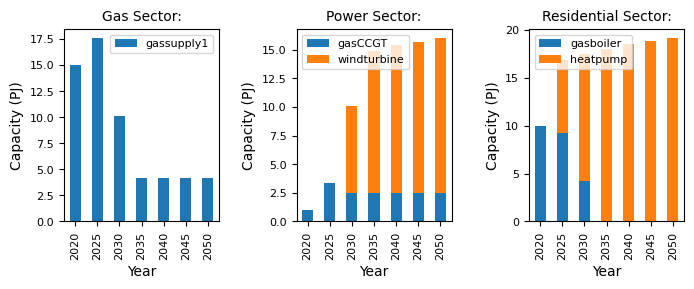
As expected, we see a different scenario emerge. The demand does not increase linearly, with variations in the total demand in the residential sector, in line with the changing population data.