9.2. Adding a service demand
In this section, we detail how to add a service demand to MUSE. In the residential sector, a service demand could be cooking. Houses require energy to cook food and a technology to service this demand, such as an electric stove. This process consists of setting a demand, either through inputs derived from the user or correlations of GDP and population which reflect the socioeconomic development of a region or country. In addition, a technology must be added to service this new demand.
This tutorial will build off the default model that comes with MUSE. To copy the files for this model, run:
python -m muse --model default --copy PATH/TO/COPY/THE/MODEL/TO
9.2.1. Adding demand for cook
First, we must edit the GlobalCommodities.csv file to add a new commodity called cook
commodity |
commodity_type |
unit |
|---|---|---|
electricity |
Energy |
PJ |
gas |
Energy |
PJ |
heat |
Energy |
PJ |
wind |
Energy |
PJ |
CO2f |
Environmental |
kt |
cook |
Energy |
PJ |
Next, we will add a cooking preset demand. To achieve this, we will first edit the Residential2020Consumption.csv and Residential2050Consumption.csv files, found within the residential_presets directory. These files allow us to specify end-use demands in 2020 and 2050, with datapoints between these years being interpolated. For simplicity, we will copy over the values from the heat column in both files, e.g. for Residential2020Consumption.csv:
region |
timeslice |
heat |
cook |
|---|---|---|---|
R1 |
1 |
1.0 |
1.0 |
R1 |
2 |
1.5 |
1.5 |
R1 |
3 |
1.0 |
1.0 |
R1 |
4 |
1.5 |
1.5 |
R1 |
5 |
3.0 |
3.0 |
R1 |
6 |
2.0 |
2.0 |
9.2.2. Adding electric_stove and gas_stove technologies
Next, we must add a technology to service this new demand. This is similar to how we added the solarPV technology in a previous tutorial. For this example, we will add two competing technologies to service the cooking demand (electric_stove and gas_stove) to the residential/Technodata.csv file. For simplicity, we will copy parameters from existing technologies: electric_stove will copy the parameters from heatpump, and gas_stove will copy the parameters from
gasboiler:
technology |
region |
year |
cap_par |
… |
Agent1 |
|---|---|---|---|---|---|
… |
… |
… |
… |
… |
… |
electric_stove |
R1 |
2020 |
8.8667 |
… |
1 |
gas_stove |
R1 |
2020 |
3.8 |
… |
1 |
Note the extreme difference in cap_par costs. For the full file please see here.
We must also add the data for these new technologies to the following files:
CommIn.csvCommOut.csvExistingCapacity.csv
This is largely a similar process to the previous tutorial. We must add the input to each of the technologies (gas and electricity for gas_stove and electric_stove respectively), outputs of cook for both and the existing capacity for each technology in each region. To prevent repetition of the previous tutorial, we will leave the full files here.
Again, we run the simulation with our modified input files using the following command, in the relevant directory:
python -m muse settings.toml
Once this has run we are ready to visualise our results.
[1]:
import matplotlib.pyplot as plt
import pandas as pd
[2]:
mca_capacity = pd.read_csv(
    "../tutorial-code/add-service-demand/1-exogenous-demand/Results/MCACapacity.csv"
)
mca_capacity.head()
[2]:
| agent | capacity | dst_region | installed | region | sector | technology | type | year | |
|---|---|---|---|---|---|---|---|---|---|
| 0 | A1 | 10.0000 | r1 | 2020 | r1 | residential | gas_stove | newcapa | 2020 |
| 1 | A1 | 10.0000 | r1 | 2020 | r1 | residential | gasboiler | newcapa | 2020 |
| 2 | A1 | 1.0000 | r1 | 2020 | r1 | power | gasCCGT | newcapa | 2020 |
| 3 | A1 | 15.0000 | r1 | 2020 | r1 | gas | gassupply1 | newcapa | 2020 |
| 4 | A1 | 7.5938 | r1 | 2025 | r1 | residential | electric_stove | newcapa | 2025 |
[3]:
fig, axes = plt.subplots(1, 3)
all_years = mca_capacity["year"].unique()
for ax, (sector_name, sector_data) in zip(axes, mca_capacity.groupby("sector")):
    sector_capacity = sector_data.groupby(["year", "technology"]).sum().reset_index()
    sector_capacity.pivot(
        index="year", columns="technology", values="capacity"
    ).reindex(all_years).plot(kind="bar", stacked=True, ax=ax)
    ax.set_ylabel("Capacity (PJ)")
    ax.set_xlabel("Year")
    ax.set_title(f"{sector_name.capitalize()} Sector:", fontsize=10)
    ax.legend(title=None, prop={"size": 8})
    ax.tick_params(axis="both", labelsize=8)

fig.set_size_inches(8, 2.5)
fig.subplots_adjust(wspace=0.5)
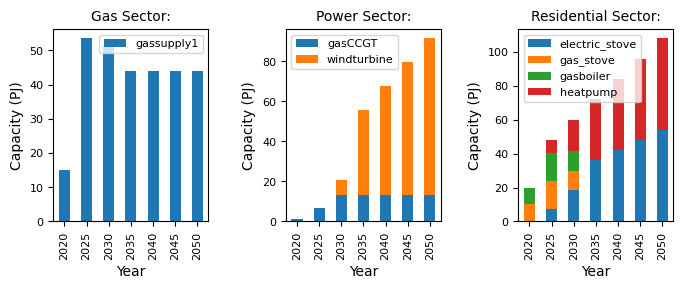
We can see that electric_stove is heavily used in the residential sector, and gas_stove is barely used at all. Therefore, compared to the default model, there is a larger increase in capacity in the power sector to accommodate this increase in demand for electricity, which is largely driven by windturbine.
9.2.3. Summary
In this tutorial we have shown how to add a service demand to MUSE, and how to add technologies to meet this demand. Try changing the demand profile for cook to see how this influences investment decisions.